
Pick up a cereal box, a magazine, or a shiny cosmetic carton. There is a good chance it was made with offset printing. This simple, smart method has printed most of the world’s books, brochures, and custom packaging boxes for over a hundred years.
In this guide, you will learn how offset printing works step by step, why it is called “offset,” what it costs, and when it is the best choice for your brand. No jargon overload. Just clear answers.
Offset printing (also called offset lithography or litho printing) is a printing method where ink moves from a metal printing plate to a rubber blanket, and then onto paper or board. It works because oil and water repel each other. The image areas on the plate hold oily ink, while the non-image areas hold water. The main steps are prepress, platemaking, make-ready, printing, and finishing. Offset printing gives sharp images, accurate brand colors, and a lower cost per unit on large print runs.
What Is Offset Printing? (And Why Is It Called “Offset”?)
Offset printing is an indirect printing method. The plate never touches the paper. Instead, the inked image is first “offset” (transferred) onto a soft rubber blanket. The blanket then presses the image onto the paper or board.
Why add that extra step? The rubber blanket is soft and flexible. It presses ink evenly into tiny dips in the surface, so you get crisp, clean prints even on textured stock like kraft paper. It also protects the metal plate, so one plate can print thousands of sheets.
A quick bit of history:
- 1796: Alois Senefelder invents lithography in Germany, using stone and the oil-and-water idea.
- 1904: Ira Washington Rubel, a New Jersey printer, notices that a print made by accident from a rubber blanket looks sharper than one from the stone. Modern offset lithography is born.
- Today: Offset presses from brands like Heidelberg, Komori, and Koenig & Bauer (KBA) use Computer-to-Plate (CTP) systems and LED-UV curing for faster, cleaner jobs.
You may also hear it called planographic printing. That simply means the image and non-image areas sit on the same flat level of the plate. Nothing is raised or carved.
The Simple Science: Oil, Water, and Three Cylinders
The whole offset printing process rests on one fact you already know: oil and water don’t mix.
The aluminum printing plate is treated so it has two kinds of areas:
- Image area (oleophilic): loves oil, so it grabs the oily ink.
- Non-image area (hydrophilic): loves water, so it holds a thin film of fountain solution and pushes ink away.
Getting the ink-water balance right is the press operator’s most important skill. Too much water and colors look weak. Too little and ink smudges into blank areas.
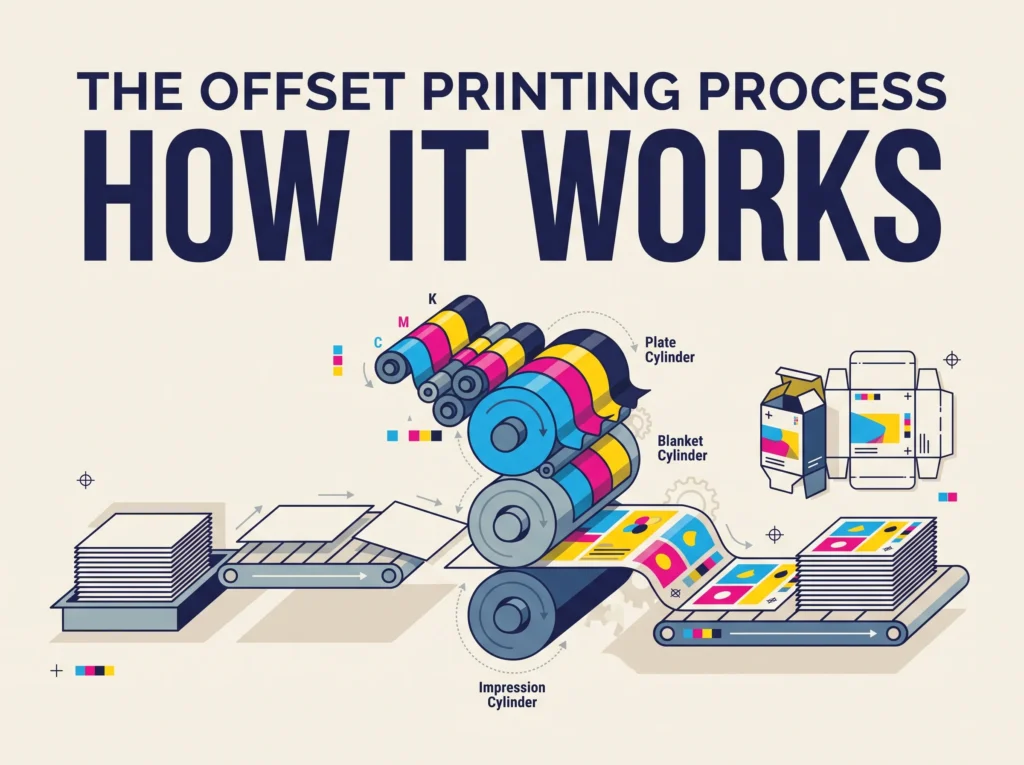
Inside each printing unit, three cylinders work together:
| Cylinder | What It Does | Simple Way to Remember |
|---|---|---|
| Plate cylinder | Holds the printing plate. Dampening rollers add water, then ink rollers add ink. | The “stamp” |
| Blanket cylinder | Covered with a rubber blanket that picks up the inked image from the plate. | The “middleman” |
| Impression cylinder | Presses the paper or board firmly against the blanket so the image transfers. | The “press” |
A full-color press has four of these units in a row, one for each CMYK ink: Cyan, Magenta, Yellow, and Key (Black). Many packaging presses add a fifth or sixth unit for spot colors or a protective coating.
Must Read: What Does Collate Mean When Printing? A Simple Guide
How Offset Printing Works: 5 Easy Steps From File to Finished Box
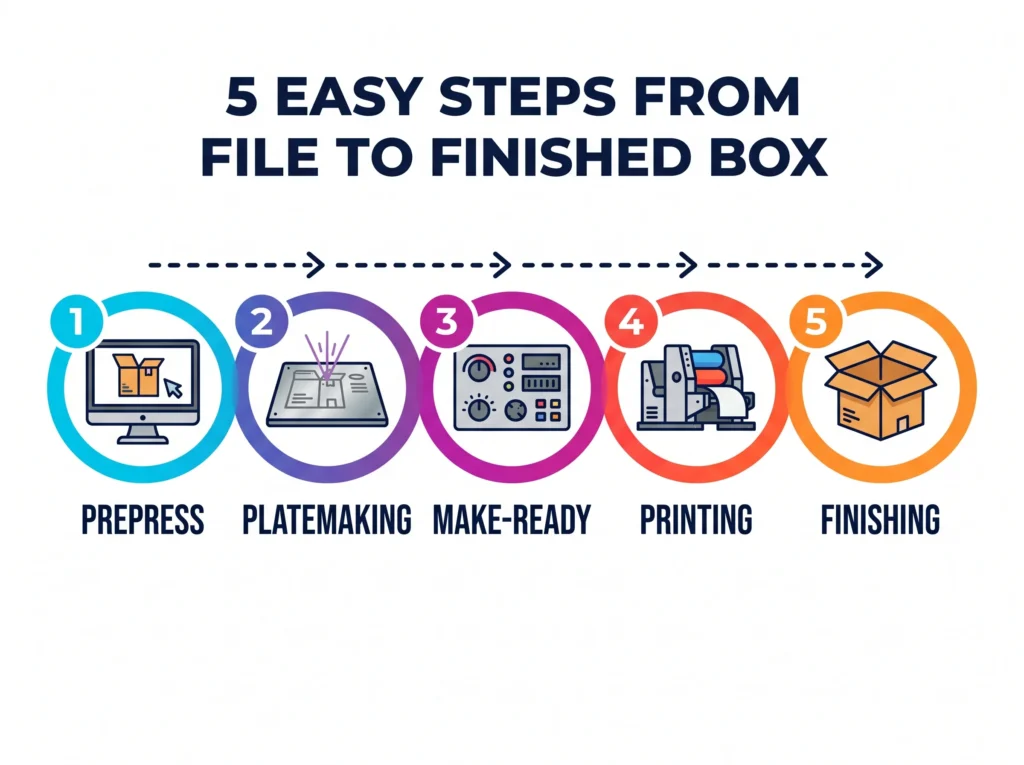
Here is the offset printing process step by step, the way a print shop runs a real job.
Step 1: Prepress (Getting the Artwork Ready)
Everything starts with your design file. The prepress team checks that it is print-ready: CMYK color mode, 300 DPI images, correct bleed, and fonts that are outlined. For packaging, the art is placed on a dieline, the flat template that shows where the box will be cut and folded.
Next comes color separation. The software splits your design into four layers, one each for cyan, magenta, yellow, and black. Each layer turns into tiny halftone dots. Your eye blends these dots into smooth colors and photos. You then approve a digital proof or press proof before anything is printed.
Step 2: Platemaking (Creating the Printing Plates)
Using Computer-to-Plate (CTP) technology, a laser draws each color layer onto its own aluminum plate. A four-color job needs four plates. A job with one Pantone (PMS) spot color needs a fifth. The plates are then mounted onto the plate cylinders.
Step 3: Make-Ready (Setting Up the Press)
Make-ready is the setup stage. The operator loads the paper or paperboard, fills the ink fountains, and tunes the ink-water balance. Test sheets run through the press until the registration is perfect, meaning all four color layers line up exactly. The operator compares the sheet to the approved proof and adjusts colors using a spectrophotometer.
This step uses some time and a few sheets of material. That is why offset printing has a setup cost, and why it pays off best on bigger orders.
Step 4: Printing (The Press Run)
Now the fun part. Sheets fly through the press at high speed, often thousands per hour. In each unit, ink goes from plate → blanket → paper. After four units, a full-color image appears. Many packaging jobs then pass through a coating unit for aqueous coating or UV coating, which adds shine and protects against scuffs.
Step 5: Finishing (Post-Press)
Once the ink dries or cures, the printed sheets go to post-press finishing. For books and flyers, that means cutting, folding, and binding. For custom packaging, the sheets are:
- Laminated (matte, gloss, or soft-touch), if chosen
- Decorated with spot UV, foil stamping, or embossing
- Die-cut into the box shape
- Folded and glued, then packed flat for shipping
Sheet-Fed vs Web Offset Printing: What’s the Difference?
There are two main types of offset presses. Packaging is almost always printed on sheet-fed offset presses.
| Feature | Sheet-Fed Offset | Web Offset |
|---|---|---|
| Paper feed | Single cut sheets | Continuous paper rolls |
| Speed | Fast | Very fast |
| Best for | Packaging, folding cartons, brochures, posters | Newspapers, catalogs, magazines |
| Board thickness | Handles thick paperboard and card stock | Mostly thinner paper |
| Print quality | Very high, great for brand color consistency | High |
| Typical run size | Medium to large | Very large |
Offset vs Digital vs Flexo Printing: Side-by-Side Comparison
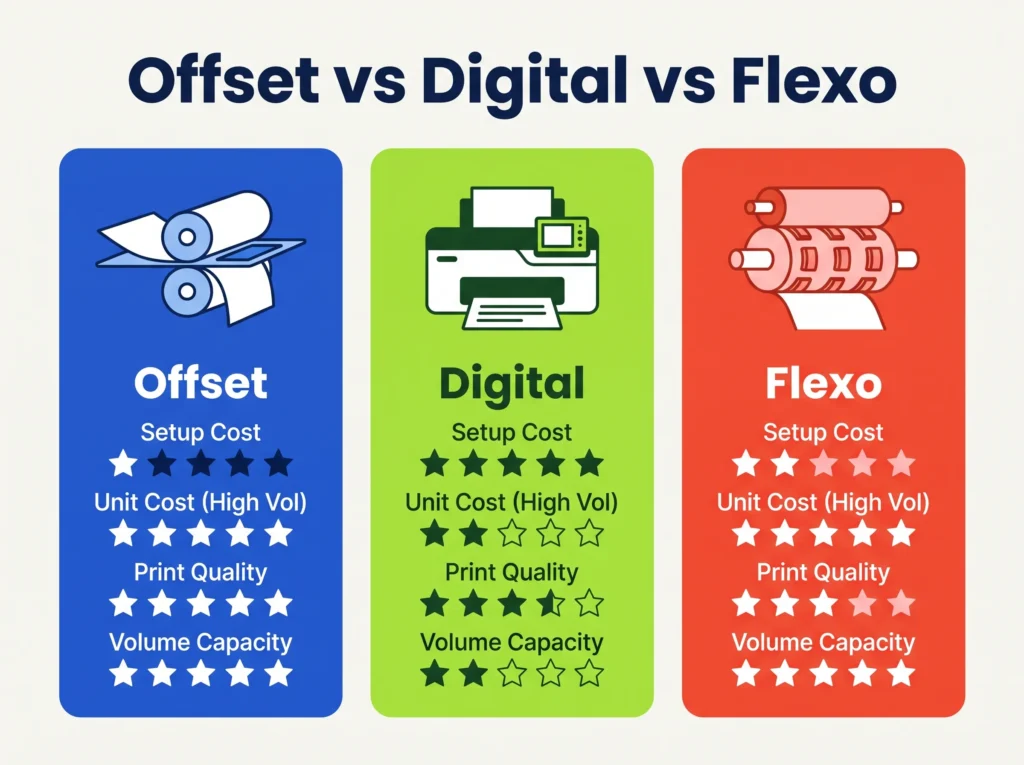
Not sure which method fits your project? This table answers the question most buyers ask: “What is the difference between offset and digital printing?”
| Factor | Offset Printing | Digital Printing | Flexography |
|---|---|---|---|
| How it works | Plate → rubber blanket → paper | Toner or inkjet straight from a file | Flexible raised plate presses ink onto material |
| Setup cost | Higher (plates + make-ready) | Very low (no plates) | High (custom plates) |
| Cost per unit | Lowest on large runs | Same price for every piece | Low on very large runs |
| Best quantity | Medium to large runs | Small runs and samples | Very large runs |
| Color accuracy | Excellent, true Pantone matching | Good, CMYK simulation | Good |
| Image sharpness | Very sharp, fine detail | Sharp | Less fine detail |
| Turnaround | Moderate | Fastest | Moderate |
| Personalization | No | Yes, variable data printing | Limited |
| Common uses | Folding cartons, product boxes, rigid box wraps, books | Prototypes, short runs, personalized boxes | Labels, corrugated shipping boxes, flexible pouches |
The simple rule: choose digital for small or personalized runs, choose offset when you want premium quality and a lower price per box at volume, and choose flexo for plain shipping cartons and labels in huge quantities.
Many printers now offer hybrid printing, mixing offset and digital on one job. For example, offset prints the main design, and digital adds unique QR codes or names.
Advantages and Disadvantages of Offset Printing
Why brands love offset printing:
- Stunning print quality. Sharp text, rich photos, and smooth color gradients.
- Accurate brand colors. True Pantone spot colors and tight color control using standards like G7 and ISO 12647.
- Lower cost per unit at scale. The more you print, the cheaper each piece gets.
- Works on many materials. Coated paper, uncoated stock, SBS paperboard, kraft board, and rigid box wrap paper.
- Consistent results. The first box and the five-thousandth box look the same.
- Pairs well with premium finishes like foil, embossing, and spot UV.
Things to plan for:
- Higher setup cost. Plates and make-ready add a fixed cost to every job.
- Higher minimum order quantity. Small runs of 50 to 100 pieces are often cheaper on digital.
- Longer lead time than digital, because of platemaking and drying time.
- No personalization. Every piece in the run is identical.
The good news? Each of these is easy to manage once you know about it. Plan your quantity, lock your artwork early, and offset printing becomes a smart, budget-friendly choice.
Offset Printing for Custom Packaging Boxes
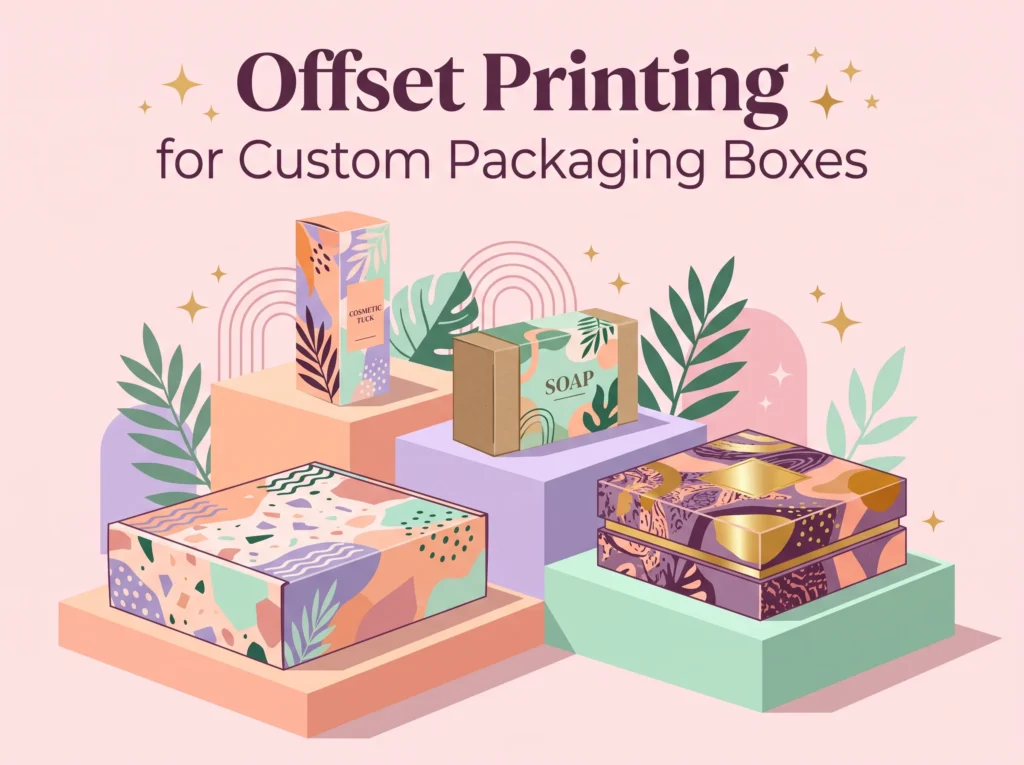
For retail packaging, offset printing is the go-to choice. It gives cosmetic, food, candle, and soap brands the clean, high-end look that catches a shopper’s eye on the shelf.
Here is how offset printing performs on common packaging materials:
| Material | Common Box Types | How Offset Performs | Pro Tip |
|---|---|---|---|
| SBS paperboard (white, coated) | Cosmetic boxes, tuck end boxes, retail cartons | Brightest colors and finest detail | Add aqueous or UV coating to prevent scuffs |
| Kraft paperboard | Eco boxes, soap boxes, bakery boxes | Earthy, natural look; colors print a bit darker | Use bold designs and darker inks for best contrast |
| Corrugated board (E/F flute) | Mailer boxes, shipping boxes | Very good with litho-lamination (printed sheet glued onto corrugated) | Ideal for premium unboxing experiences |
| Rigid chipboard with wrap paper | Luxury gift boxes, jewelry boxes | Excellent; the wrap paper is offset printed | Pair with soft-touch lamination and foil |
| Coated art paper | Sleeves, inserts, labels | Crisp and vivid | Great for matching inside and outside branding |
At ONO Custom Boxes, offset printing is the standard for most custom printed box orders because it keeps brand colors consistent from the first carton to the last.
When to choose offset for your boxes:
- You need a few hundred boxes or more of the same design.
- Your logo uses a specific Pantone color that must match every time.
- You want premium finishes like foil stamping, embossing, or spot UV.
- You plan to reorder the same design again.
Offset Printing Cost, Minimum Order, and Turnaround Time
These are the three questions buyers worry about most. Here are straight answers.
Why does offset printing get cheaper as you order more? Most of the cost is in setup: making plates and running make-ready. Those costs stay about the same whether you print 500 boxes or 5,000. Spread over more boxes, the cost per unit drops fast.
Which method fits your quantity? Exact break-even points change by printer, box size, and material, but this general guide works for most packaging jobs:
| Order Quantity | Best Printing Method | Why |
|---|---|---|
| 1–100 boxes | Digital | No plate cost, so small runs stay affordable |
| 100–500 boxes | Digital or offset (get both quotes) | The break-even point often falls in this range |
| 500–5,000 boxes | Offset | Setup cost is spread out; price per box drops |
| 5,000+ boxes | Offset (or flexo for plain shipping boxes) | Lowest cost per unit and the most consistent color |
How long does offset printing take? Printing itself is fast. The full timeline includes:
- Artwork check and proof approval
- Platemaking and make-ready
- Printing and drying or curing
- Finishing: lamination, die-cutting, gluing
- Shipping
For custom boxes, plan for about 2 to 3 weeks in production after proof approval, plus shipping. Ask your supplier for a firm date before you order.
Tip to save money: Fast proof approval is the easiest way to speed things up. Most delays happen before the press ever starts.
Print-Ready File Checklist for Offset Printing
A clean file means fewer proof rounds and a faster delivery. Run through this checklist before you send your artwork:
- Color mode set to CMYK, not RGB (RGB colors can look dull once printed)
- Pantone (PMS) codes listed for any exact brand colors
- Images at 300 DPI at full print size
- Bleed of at least 1/8 inch (3 mm) on all sides
- Important text kept at least 1/8 inch inside the cut line (the safe zone)
- Artwork placed on the supplier’s correct dieline
- Fonts converted to outlines
- Rich black for large dark areas; 100% K for small text
- Finishes like spot UV or foil set on their own separate layer
- File saved as print-ready PDF or AI
Why does my print look different from my screen? Screens glow with light (RGB), while print uses ink on paper (CMYK). Some bright screen colors simply can’t be reached with ink. A press proof or physical sample is the best way to see true colors before the full run.
Is Offset Printing Eco-Friendly? Plus 2026 Trends
Yes, offset printing can be a smart choice for green brands, and it keeps getting cleaner.
- Soy-based and vegetable-based inks cut down on petroleum use and make paper easier to de-ink during recycling.
- Aluminum plates are recyclable, and many print shops send used plates back for recycling.
- Less waste on long runs. Once the press is set up, very few sheets are wasted.
- Recyclable printed packaging. Offset-printed paperboard boxes can go in most curbside recycling bins (some coatings or laminations may affect this; check your local rules).
- FSC-certified board lets brands show their paper comes from responsibly managed forests.
Trending in offset printing right now:
| Trend | What It Means for Your Brand |
|---|---|
| LED-UV offset printing | Ink cures instantly under LED light, so jobs move to finishing faster and use less energy |
| Hybrid printing | Offset quality plus digital personalization on one box |
| Automation and AI in prepress | Fewer file errors and quicker proofs |
| G7 color management | More consistent color across different printers and reorders |
| Eco-friendly packaging printing | Soy inks, water-based coatings, and plastic-free finishes |
| Premium unboxing finishes | Soft-touch lamination, spot UV, and foil on offset-printed boxes |
Frequently Asked Questions
1. What is offset printing in simple words?
It is a printing method where ink goes from a metal plate to a rubber blanket, and then onto paper. It uses the fact that oil and water don’t mix.
2. Why is it called offset printing?
Because the image is “offset,” or transferred, from the plate to a rubber blanket before it reaches the paper. The plate never touches the paper directly.
3. What are the main steps of the offset printing process?
Prepress, platemaking, make-ready, printing, and finishing.
4. Is offset printing cheaper than digital printing?
For large quantities, yes. Offset has a higher setup cost, but a much lower price per piece once you print a few hundred units or more.
5. What is the minimum order for offset printing?
It depends on the printer. For custom boxes, offset usually becomes worth it from around 500 units, while smaller orders often suit digital printing.
6. What is the role of water in offset printing?
Water (fountain solution) coats the blank areas of the plate so ink only sticks to the image areas.
7. What is the difference between CMYK and Pantone?
CMYK mixes four inks to create colors. Pantone uses pre-mixed spot inks for exact, repeatable brand colors.
8. Can offset printing be done on kraft or cardboard boxes?
Yes. Offset prints well on kraft board and paperboard. For corrugated boxes, the printed sheet is usually laminated onto the board (litho-lamination).
9. What printing plate material is used in offset printing?
Most modern offset plates are thin aluminum, made with Computer-to-Plate (CTP) technology.
10. Is offset printing good for small businesses?
Yes, once your order size grows. Many brands start with digital for samples, then switch to offset to lower their cost per box.
Key Takeaways
- Offset printing moves ink from a plate to a rubber blanket, then onto paper or board.
- It works because oil and water repel each other.
- The five steps are prepress, platemaking, make-ready, printing, and finishing.
- It offers sharp quality, true Pantone colors, and the lowest cost per unit on larger runs.
- For custom packaging boxes, offset is the top pick for orders of around 500 units and up. Digital printing suits small runs and samples.
Ready to bring your packaging to life? Send your dieline and quantity to your packaging supplier and ask for an offset and a digital quote side by side. You’ll quickly see which one saves you more.